

Build Your CX & Revenue Intelligence Business Case In Three Clear Steps
For internal champions who need to align stakeholders, quantify impact conservatively, and move the decision forward—without building everything from scratch.
This Page Is For:
- Teams that have already seen MiaRec and want to move the decision forward
- Champions preparing to brief leadership, finance, or an economic buyer
- Buyers who need evidence-backed inputs, not optimistic projections
This Page Is Not:
- A product overview or feature explanation
- A step-by-step training course
- Something you’re expected to complete on your own
How To Build Your Business Case In 3 Simple Steps
Most business cases fail not because the solution is weak, but because the story is unclear or the assumptions don’t hold up under scrutiny.
We have helped hundreds of organizations successfully implement AI-driven Conversation Intelligence solutions. Buying committees, leadership, and finance want to see a simple, evidence-based, conservative business case.
Step 1: Define the Problem & Align on the Business Case
Decide which business case you will build: CX Intelligence or Revenue Intelligence. This doesn’t lock you into one outcome — it simply gives your business case a clear starting point.
Step 2: Quantify Impact
Use the appropriate calculator to conservatively estimate impact, anchored in one measurable lever: churn reduction for CX or close-rate improvement for Revenue.
Step 3: Use The Deck And Present
Insert your outputs into the ready-to-use presentation deck and walk into the buying committee meeting with a clear, defensible story and measurable next steps.
Resources Included
On this page, you will find all the resources you need on one page: a Business Case Presentation Template (PPTX) and an ROI Calculator, both for MiaRec Customer Experience (CX) Intelligence or Revenue Intelligence.
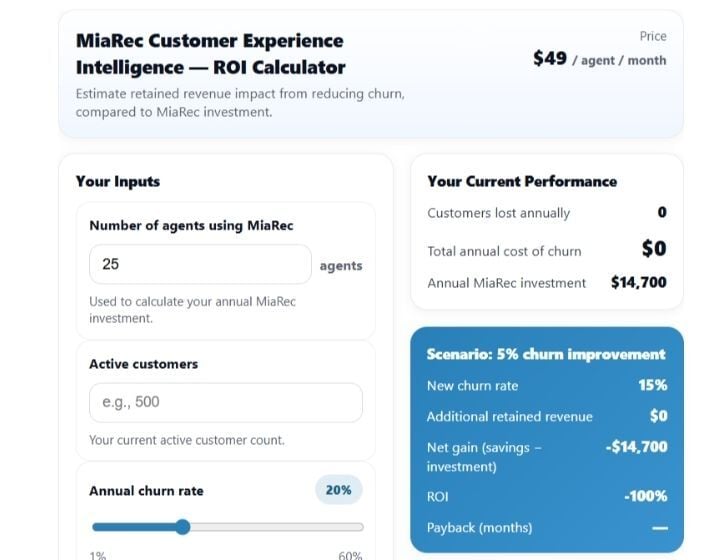
ROI Calculator
A conservative ROI model (incl. calculator) you can confidently defend under scrutiny.
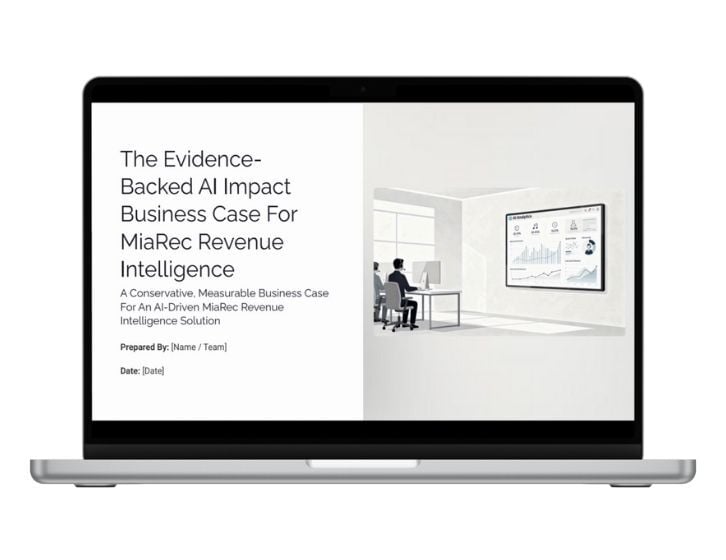
Slide Deck Template
A downloadable slide deck template to present to the buying committee.
Step 1 — Define The Problem And Align On The Business Case
Before running numbers or building slides, align on the core issue you are solving. The first step is simply choosing what matters most for this decision: Customer Experience and Revenue Intelligence. This gives your business case a focused starting point (you can always reference both later).
Customer Improvement (CX) Intelligence
Best if: Your primary concern is to enhance customer experiences to improve retention, renewals, service quality, or reduce customer risk.
You are trying to answer questions like these at scale:
- Where are customers getting stuck or frustrated?
- How much risk do we have that we can’t see?
- Why do experience issues keep surfacing too late?
- How can we use insights to delight our customers?
How the problem typically shows up
- Limited visibility into customer experience across 100% of conversations
- Quality and coaching that rely on sampling, not reality
- Issues are discovered after customers are already at risk
Expected Outcomes: You’ll quantify impact by estimating churn reduction from measurable improvements in call recordings.
Typical outcomes discussed in this path:
- Reduced churn exposure
- Fewer repeat contacts or escalations
- More consistent quality and coaching
Revenue Intelligence
Best if: Your primary objective is to improve close rates, reduce stalled deals, or eliminate revenue leakage caused by execution gaps.
You are trying to answer questions like these at scale:
- Why are deals being lost or delayed?
- Where are follow-ups breaking down?
- Which objections consistently stall opportunities?
- What do top performers do differently in real conversations?
How the problem typically shows up
- Inconsistent close rates across reps and teams
- Limited insight into why deals are won or lost
- Coaching decisions based on anecdotes or lagging results
Expected Outcomes: You’ll quantify impact by estimating the improvement in close rate driven by better execution visibility and coaching.
Typical outcomes discussed in this path:
- Improved close rate trends
- Reduction in stalled or lost deals
- Increased rep productivity
- Shorter sales cycles
Step 2: Quantify Your Impact
Now it is time to quantify the expected business impact. We recommend using a conservative, finance-friendly model. To make the conversation tangible, we provide two ROI calculators: one for CX Intelligence to estimate impact through churn reduction, and one for Revenue Intelligence to estimate impact through improved close rates.
For CX Intelligence
Use this if: Your business case is anchored in retention, renewals, and customer risk reduction.
This calculator helps you estimate:
- Current churn exposure tied to CX inconsistencies
- The cost of doing nothing
- Conservative impact from measurable improvements in call performance
You will input:
- Current churn rate
- Revenue per customer (or account value)
- A modest improvement assumption
You will get:
- Annual revenue at risk today
- Retained revenue opportunity from churn reduction
- A conservative range suitable for Finance review
For Revenue Intelligence
Use this if:
Your business case is anchored in revenue execution, conversion, and missed opportunity recovery.
This calculator helps you estimate:
- Revenue currently impacted by stalled or lost deals
- The cost of execution gaps and missed follow-up
- Conservative upside from improving close-rate performance
You will input:
- Revenue base influenced by sales conversations
- Current close rate
- A modest improvement assumption
You will get:
- Annual revenue at risk today
- Retained revenue opportunity from execution improvement
- A conservative range suitable for Finance review
Step 3: Use The Deck & Present
You now have alignment on the problem and a quantified impact model. The final step is to package that into a clear, executive-ready business case and present it with confidence.
Use The Business Case Deck
Download the pre-structured presentation template designed specifically for buying committee conversations.
It already follows the flow leadership expects:
- What we are buying
- Why it matters operationally
- What happens if we do nothing
- Quantified impact
- Governance and measurement
- Timeline, scope, and security
You are not starting from scratch. You are inserting your data into a proven structure.
Insert Your Impact Model
Once you’ve run the calculator, copy the outputs into the highlighted sections of the slide deck.
Typically, this includes:
- Slide 7: The Unseen Cost of Inaction
- Slide 9: Conservative ROI Summary
- Slide 16: Assumptions appendix
You do not need to add additional analysis or commentary unless your organization requires it. Keep the numbers clear and conservative. Simplicity builds credibility.
You are now ready to present!
Want A Second Pair Of Eyes On Your Business Case Before You Present?
Feel free to schedule a working session with a MiaRec specialist who has supported hundreds of contact centers across industries. This is not a sales call but an opportunity to pressure-test your framing, refine assumptions, make the story sharper and clearer, and anticipate executive questions.