
Please note: this is legacy documentation. Please check out https://docs.miarec.com/ for the most up-to-date documentation and user guides.
This guide contains instructions on how to configure Port Mirroring for Cisco Catalyst 2960 Series Switches.
Step 1. Connect all your devices as shown on the following network diagram.
Local PBX
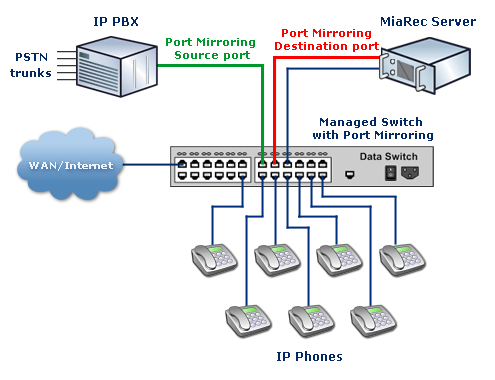
All IP Phones, for which a call recording is necessary, should be connected to Cisco Catalyst 2960 Series Switches.
MiaRec also should be connected to Cisco Catalyst 2960 Series Switches.
Hosted PBX
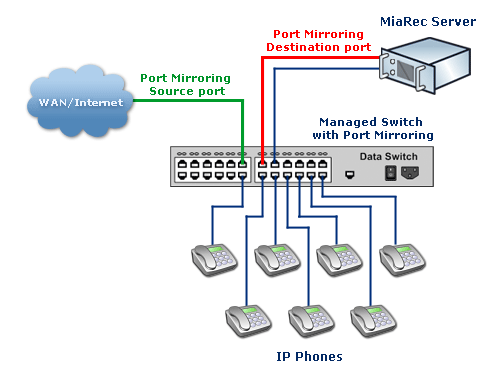
All IP Phones, for which a call recording is necessary, should be connected to a Cisco Catalyst 2960 Series Switch.
MiaRec also should be connected to a Cisco Catalyst 2960 Series Switch.
Step 2. Configure the Port Mirroring function on the switch.
Let's assume MiaRec Server is connected to port 3. On the network diagram, it is shown in a red color (Analysis port).
And port 5 is used for connecting to IP-PBX (if you have one) or uplinking to WAN/Internet (if you do not have IP-PBX). On the network diagram, it is shown in green color (Monitored port).
In this case, you need to execute the following command on the switch:
1. Enter configuration mode:
C2960# configure terminal
2. Create a monitoring session and configure interface Fast Ethernet 0/5 as the source port for that session:
C2960(config)# monitor session 1 source interface fastethernet 0/5
3. Configure interface Fast Ethernet 0/3 as destination port for session 1.
C2960(config)# monitor session 1 destination interface fastethernet 0/3
4. Check, if everything is configured correctly:
C2960# show monitor session 1

Session 1
---------
Source Ports:
 RX Only:       None
 TX Only:       None
 Both:           Fa0/5
Destination Ports: Fa0/3
Now a configuration is completed and you should be able to record calls with MiaRec Business.
Should you have any questions or issues, please, do not hesitate to contact our support team.
Caution! If you have inter-office calls (between local phones), then every phone's port should be set as a Source Port (Cisco Catalys 2960 switches supports monitoring of multiple ports).
You will need to execute the command in point 2 (see above example) multiple times for every port:
C2960# configure terminal

C2960(config)# monitor session 1 source interface fastethernet 0/6
C2960(config)# monitor session 1 source interface fastethernet 0/7
C2960(config)# monitor session 1 source interface fastethernet 0/8
C2960(config)# monitor session 1 source interface fastethernet 0/9
C2960(config)# monitor session 1 source interface fastethernet 0/10
C2960(config)# monitor session 1 destination interface fastethernet 0/3
That assumes you have 5 IP Phones and they are connected to ports 6, 7, 8, 9, and 10 on the switch and the MiaRec server is connected to port 3.
More detailed information about the configuration of SPAN can be found on the Cisco website:
Catalyst Switched Port Analyzer (SPAN) Configuration Example
Should you have any questions or issues, please, do not hesitate to contact our support team.